Konstrukt Is MIDIRack Renamed: Kai Aras's MIDI Toolkit Becomes an AUv3 Host and Groovebox Builder for iPad and iPhone

When Kai Aras launched MIDIRack in August, the name described the app exactly: a MIDI instrument builder. With version 1.2, that name no longer fits. In the standalone app, version 1.2 hosts AUv3 instruments and effects, ships its own synths, drum machine and effects, mixes everything on a channel-strip Rack and records stems to WAV. So MIDIRack is now Konstrukt. It's a toolkit for building a groovebox, a DAW controller, an MPE instrument or a hardware sequencer, depending on what you lay out on the screen.
Existing owners get it as a free update, and their purchases, patches, presets and settings carry over. One thing keeps the old name on purpose: the virtual MIDI port is still called "MIDIRack Out", so DAW templates and host routings built around it keep working.
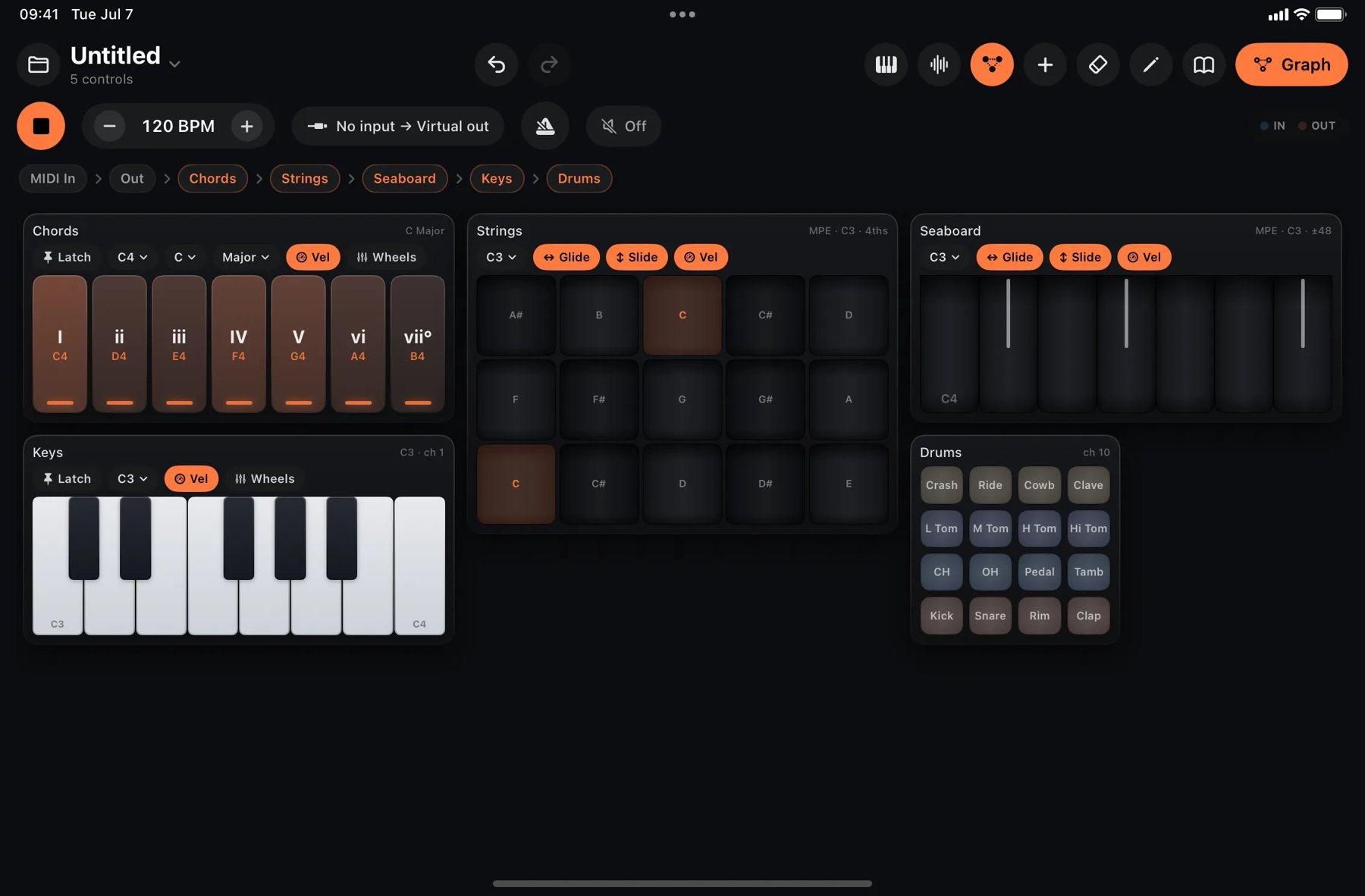
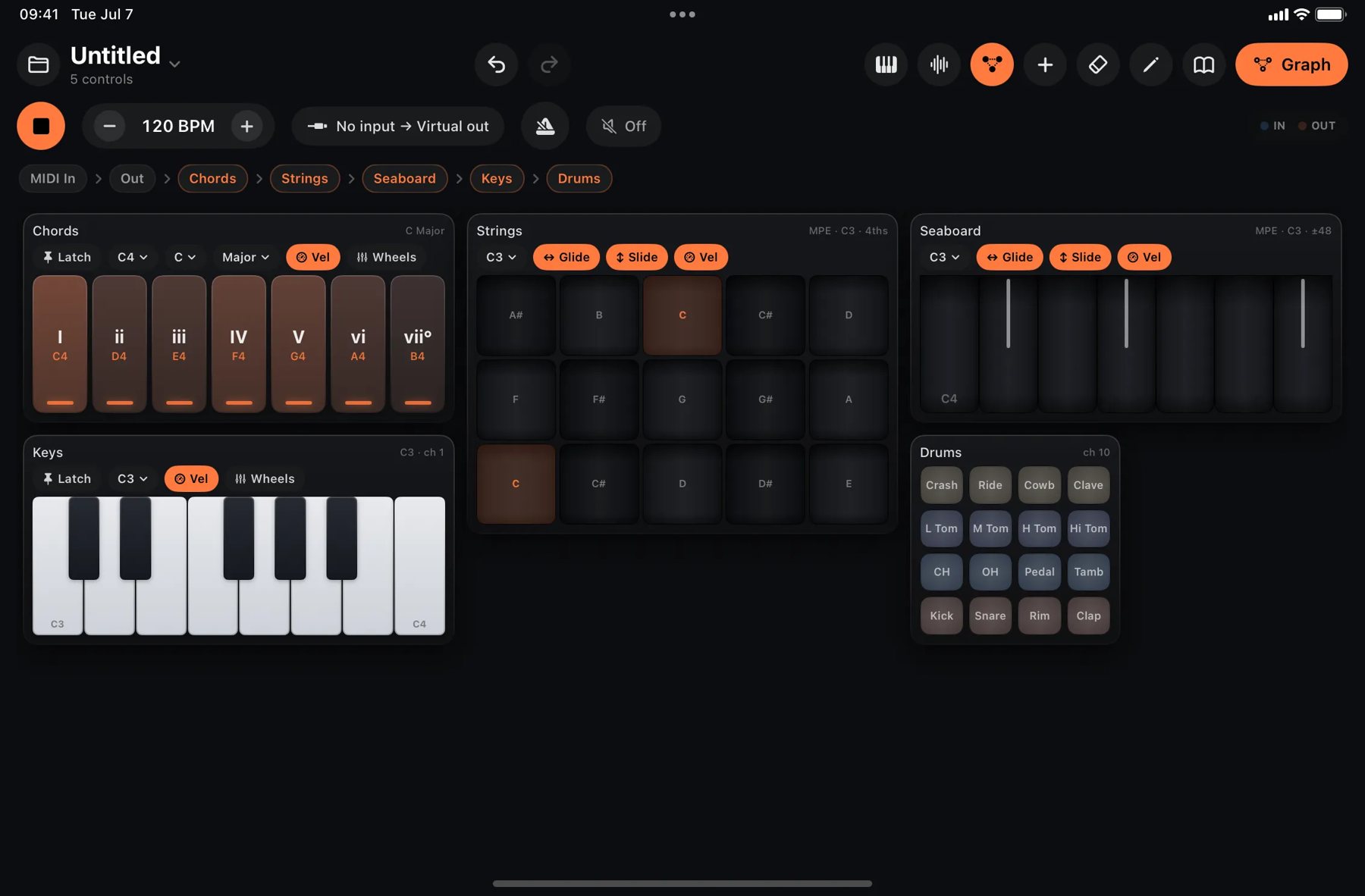 A Konstrukt surface built from blocks: diatonic chord pads, a 4×4 drum grid, a piano and faders. Image: Numerical Audio
Two layers: the surface you play, the graph underneath
Konstrukt is built in two layers, and understanding them is the key to the whole app.
On top is the surface. You put blocks on a snapping grid and organize them into named pages, much like banks on a hardware controller. The six keyboards, each with its own arpeggiator, come from Aras's earlier KB-1 Expressive Keyboard Suite: piano, diatonic chord pads, a scale-locked keyboard, a Seaboard-style MPE ribbon, a LinnStrument-style MPE Strings grid in fourths, and a 4×4 drum pad grid. Alongside them sit knobs, faders, XY pads, buttons, sequencer cards and live visualizers. KB-1 itself remains a separate app and keeps working as before. Konstrukt is its successor, not an update to it.
Underneath is the graph: one visual canvas that carries both MIDI and audio and runs everything the surface does. Every keyboard is a routable node there. MIDI travels on wires, audio on green cables and modulation on amber edges. There are more than 80 node types, including arps, scale quantizers, chord generators, echoes, swing, Euclidean rhythms, LFOs, CC tools, instruments and effects.
The pricing follows the same split. The app costs $7.99 and contains the whole instrument: surfaces, sequencers, built-in instruments and effects, AUv3 hosting, the Rack, recording and Ableton Link. It runs standalone and as an AUv3 MIDI processor or instrument; plug-in hosting, audio input and recording are standalone-only. The optional Graph Editor Unlock is a one-time $7.99 in-app purchase, and it unlocks the editor and nothing else. That means adding, wiring and deleting nodes, binding surface controls to any parameter in the patch (without the unlock they bind to MIDI CC), Fragments, and saving your own graph patches. Factory graph patches open and play without the unlock. There's no subscription, and one purchase covers both iPad and iPhone.
What's new in 1.2
The biggest change is sound. In the standalone app, Konstrukt hosts AUv3 instruments, effects and MIDI effects inside a patch, with floating plug-in windows, presets, and parameters you can bind to surface controls with the Graph Editor Unlock. If you don't want to use a plug-in, the built-in sources cover a lot: a two-oscillator Analog synth, a Wavetable synth, Drums, MegaSaw, a Sampler and a loop Slicer. The effects are Drive, Filter, Delay, Reverb, Compressor, EQ, Chorus and Phaser, each with its own panel, and the built-in instruments come with 164 factory sounds.
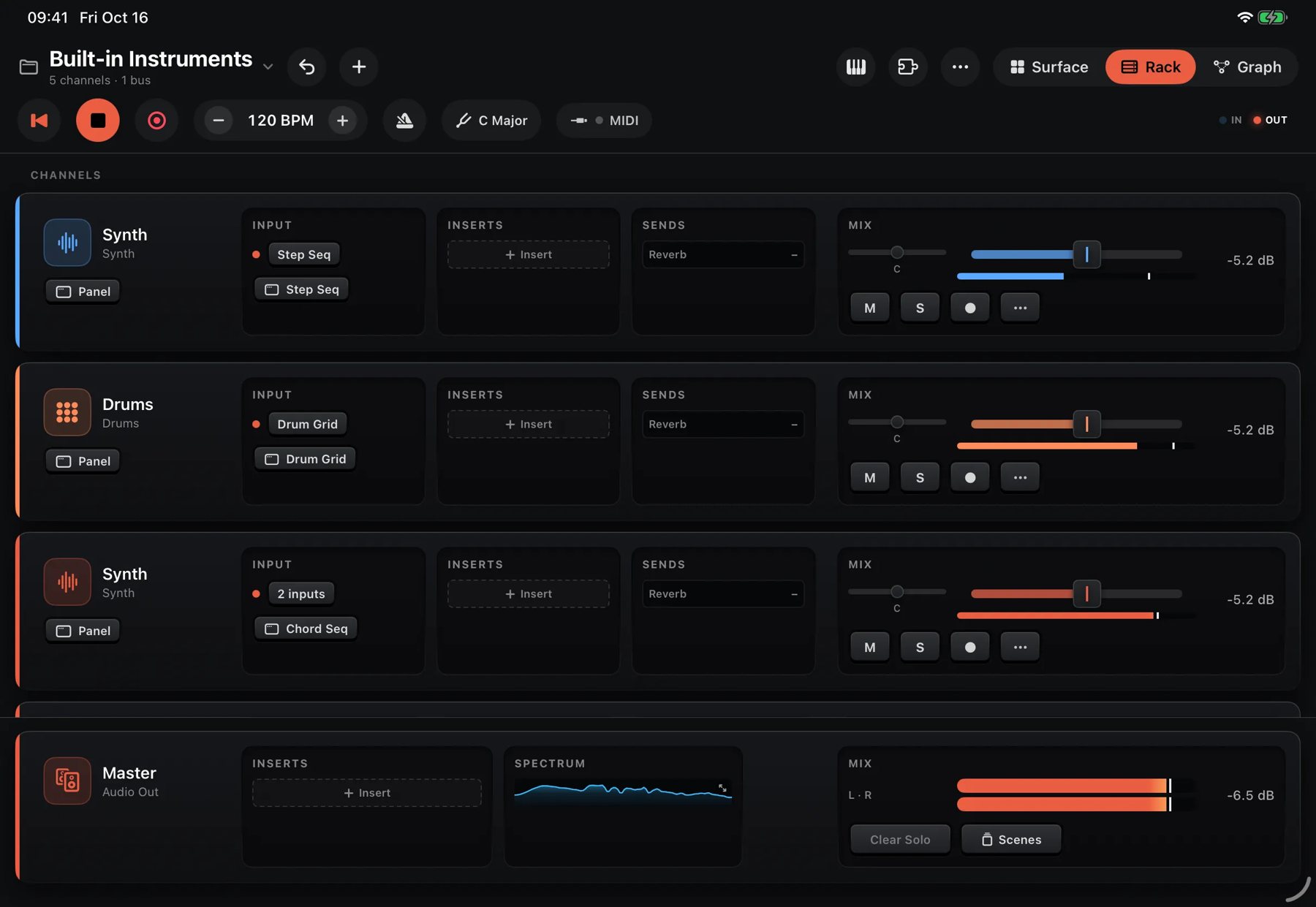 The Rack page: one strip per instrument, with inserts, sends and a master bus. Image: Numerical Audio
The new Rack page puts the audio side in one place. Each instrument gets a channel strip with fader, pan, mute, solo, inserts, pre- or post-fader sends to bus strips, sidechain and MIDI Learn. The master has its own inserts, scenes recall every level with a fade, and hardware synths join as External Instrument channels. The Rack is simply the graph seen as strips. Add audio input for a mic or guitar, master and stem recording to 24-bit WAV, a metronome with count-in, Ableton Link, MIDI clock in and out, and multi-output routing on multi-channel interfaces.
There are also new sequencers. The Drum Grid fits a whole kit into one lane, the Beat Map is an X/Y pad that blends drum patterns, the Metropolis-style Stage Seq gives each of its eight stages a pitch and a pulse count, and the Chord Seq adds Rhythm, Strum and Voicing layers. Every lane holds patterns up to four bars long in eight banks, with per-step probability, Elektron-style trigger conditions, ratchets and microtiming. Players write Drum, Drum Grid, Step, Analog or Chord Seq patterns for you: tap the star on a supported lane, choose a style, set the Complexity slider, and you get an ordinary pattern you can edit. On the graph side, Fragments (also called Components) collapse a cluster of nodes, along with their surface cards, into one reusable card with real ports.
Five ways to put it to work
Build your own groovebox. In the standalone app, start with a Drum Grid lane driving the Drums, then add a Chord Seq or Analog Seq feeding the Analog synth. Put a hosted AUv3 synth on a third channel for leads. On the Rack, send the drums and the AUv3 to a shared reverb bus and duck the pads with a sidechain from the kick. Scene Pads switch every lane's pattern bank at once, and Rack scenes fade between mix states, which gives you arrangement moves on the fly. When the take is right, record the stems to 24-bit WAV. On iPhone, the app runs in landscape with a folding menubar and a full-screen lane editor, so the same patch goes with you.
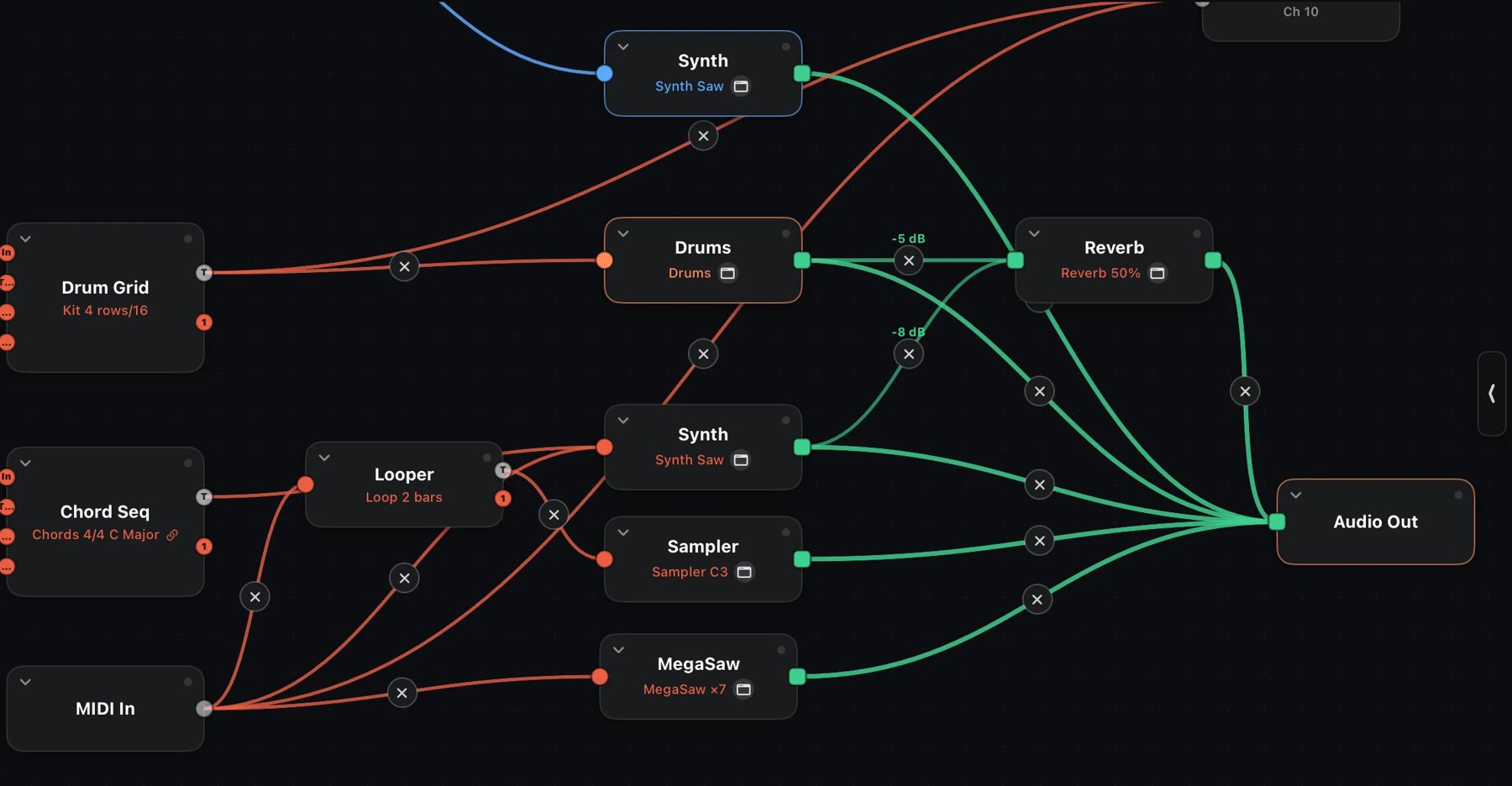 The same groovebox seen as a graph: MIDI wires into instruments, green audio cables through a reverb to the output. Image: Numerical Audio
Use it as an MPE controller for your desktop DAW. Connect the iPad or iPhone to a Mac with one USB cable and enable it in Audio MIDI Setup. "MIDIRack Out" then appears as a MIDI source in Logic, Live, Bitwig or Cubase, with no driver or helper app. Bluetooth MIDI also works. The same MPE surfaces can just as easily drive an expressive iPad instrument such as Glinster. Lay out a page with the Seaboard ribbon for leads, the Strings grid for pads, and faders on CC for filter moves, and let the step lanes clock to your DAW and drive its tracks.
Run a hardware rig from it. Add each hardware synth to the Rack as an External Instrument, send MIDI clock out, and let Konstrukt's lanes sequence the rig across 16 channels. A Stage Seq into a mono synth plus a Drum Grid into a drum machine makes a compact live setup.
Write generative music. The six emergence nodes are Game of Life, Wolfram rules, a Turing machine, Markov chains, bouncing balls and a Lorenz attractor. They're all clock-synced, and when you quantize them to the patch key, they evolve without leaving the scale. Factory patches such as Conway Choir, Turing Bass and Berlin School show how they work, and they play without the unlock.
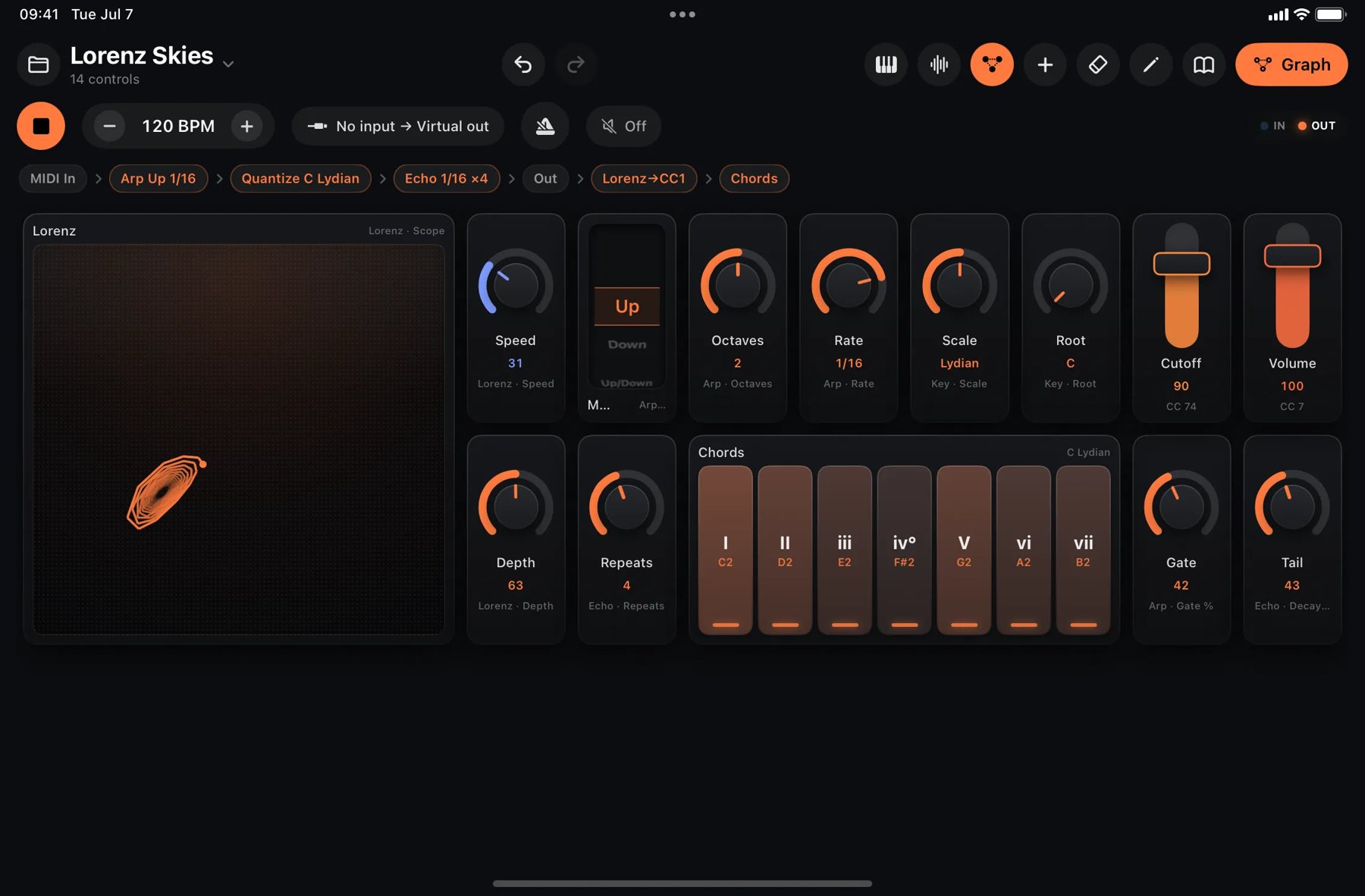 Lorenz Skies: an attractor scope sits beside knobs, faders and chord pads on the performance surface. Image: Numerical Audio
Load it in your host as an AUv3. Konstrukt loads as a MIDI processor or instrument in AUM, Loopy Pro, Drambo, Cubasis, GarageBand or Logic Pro, and its tempo-synced nodes follow host transport. With the unlock, a bare MIDI In → Quantize → Arp → MIDI Out graph makes a custom MIDI effect for any track. Keep in mind that plug-in hosting, audio input and recording only work in the standalone app.
Who it's for
Konstrukt suits players who like to design their own instrument: controllerists, MPE players without dedicated hardware, people who run hardware synths from an iPad, and anyone who likes the idea of a groovebox they can rewire. The base app is a full surface and keyboard builder on its own, so you can skip the unlock until you want to patch.
Konstrukt arranges with pattern chains, banks and scenes. If you'd rather start from a finished all-in-one groovebox than build one, Tonaut 2.3 is the other route on iPad and iPhone.
Konstrukt requires iPadOS 17 or later, or iOS 17 or later, and a Mac version for Apple silicon is next. Details are on the Konstrukt product page, and the app is on the App Store for $7.99, with the $7.99 Graph Editor Unlock as an optional in-app purchase.